
Beanstack Tracker
Zoobean, Inc.Education
4.72.02K Reviews
- Version
- 6.1.5
- Installs
- 500.00K
- Age Rating
- Everyone
Screenshots

Our Review of Beanstack Tracker
 Analysis by Appyee
Reading goals are easy to set and surprisingly easy to forget. I have started plenty of books with good intentions, only to lose track of the title, the pages, or the reason I picked it up in the first place. Beanstack Tracker takes a more organized approach: it turns reading into something I can record, revisit, and connect with personal challenges. That makes it more useful than a simple digital bookshelf, especially for families, students, and anyone who responds well to visible progress.
What I like most is that the app treats reading as a habit rather than a one-time task. The focus is not only on finding a book, but also on keeping momentum. Its tools for challenges and tracking give each reading session a place in a larger routine. The experience is intentionally practical, although it depends on how consistently I record what I read and how well the surrounding library or reading program fits my needs.
How Beanstack Tracker fits into everyday reading
Beanstack Tracker is an education app from Zoobean, Inc., available free of charge for Everyone. It was released on Apr 30, 2018, and the current version is 6.1.5, requiring at least OS 8.0. Those details matter because the app is aimed at broad use rather than a narrow group of specialist readers. I can imagine it on a child’s device, a parent’s phone, or a student’s tablet without the experience feeling out of place.
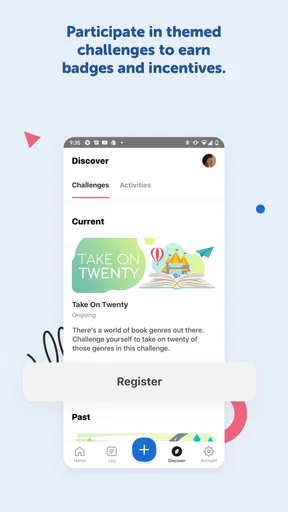
The basic idea is straightforward: I use the app to keep my reading activity visible and take part in reading challenges. That sounds simple, but the difference between remembering a goal and actually following it is often the record-keeping. A paper chart can work, and a notes app can hold a list, but Beanstack Tracker gives reading a dedicated space. The structure encourages me to return after finishing a chapter, a book, or another milestone instead of leaving the goal floating in my memory.
The app has built a sizeable audience, with over 500 thousand installs and a 4.7 average from around 20 thousand ratings. I see that as a sign that its central approach is easy for many people to understand, not proof that it will suit every reading style. The experience is strongest when I want gentle accountability. It is less compelling if I already maintain a detailed reading system and have no interest in challenges.
Why the tracking feels more useful than a plain list
A plain list answers one question: what have I read? Beanstack Tracker is more useful when I want to ask several questions together. What am I working toward? Have I kept up recently? Which reading activity belongs to a particular challenge? That shift from storage to participation is the app’s main strength.
I also find that tracking changes the emotional weight of a small reading session. Ten minutes before bed can feel insignificant when it disappears immediately. When I record it as part of a continuing habit, it becomes evidence that I am still moving. This is particularly helpful for reluctant readers, children who need a visible sense of progress, or adults trying to rebuild a routine after a busy period.
There is a trade-off, though. A tracking system only helps when I use it. If I regularly postpone recording, the app can become another unfinished task. My practical advice is to log reading at the moment I stop, while the title and activity are still fresh. Waiting until the end of the week makes the process more tedious and weakens the connection between reading and progress.
Where connectivity changes the experience
Connectivity matters most when the app needs to refresh the information around my reading activity. Challenges, account-related activity, and any content that must be updated are naturally more comfortable when the phone has a reliable connection. In a strong network environment, the app feels like a living reading dashboard rather than a static notebook: I can check the current context, record progress, and continue with the next step.
That becomes more noticeable in places where service is inconsistent. A library basement, a school hallway, public transport, or a crowded event can turn a quick tracking moment into a pause while the app catches up. I would not build my routine around assuming that every action will work without a connection. Instead, I would treat the app as something to use when the device can communicate normally and keep a simple mental note of anything I need to record later.
This does not make the app unsuitable for mobile use. It simply means that connectivity is part of the experience rather than an invisible detail. Before leaving home for a reading event, I would open the app while connected and make sure I know which challenge or activity I am following. That small preparation reduces friction when I am away from a dependable network.
For parents, this has a practical consequence. If a child is expected to track reading during a school day or on a trip, I would not assume the child can solve a connection problem independently. It is better to establish the routine at home, where an adult can help if the app does not immediately display the expected information. The goal is to support reading, not let a technical delay become the main event.
Using it in real mobile situations
The most convincing use case for me is a family reading routine. Imagine a child reading before school, a parent checking progress after dinner, and both returning to the same challenge over several days. The phone is not replacing the book; it is acting as the shared record that helps everyone remember the commitment. That is where Beanstack Tracker feels more purposeful than a general notes application.
Another good setting is a classroom or organized reading period. A student can approach reading as part of a group goal instead of treating every book as an isolated assignment. The challenge framework can make participation feel more concrete, especially for students who respond to milestones. The important point is to keep the app secondary. If logging becomes more demanding than reading, the routine has been designed badly.
I can also see value during travel, but with a little planning. A reader might choose books before leaving, use connected moments to check the relevant challenge, and record activity when the phone is working normally. On a long journey, I would keep a short backup note of titles or sessions rather than relying on memory. That is not a criticism unique to this app; it is a sensible habit whenever a digital tracker is part of a routine that moves between networks.
For adults, the app works best when the goal is modest and specific. “Read more” is vague. A defined challenge gives me a reason to open the app, while tracking helps me see whether my intention is becoming behavior. I would use it for a seasonal reading push, a family goal, or a return to regular reading after a long break. I would not choose it as my only tool for detailed literary research or a complex personal archive.
What happens when connection or routine breaks
Every tracking app faces the same uncomfortable moment: I forget to log an activity, the phone has weak service, or I open the app expecting a current view and have to wait. The important question is whether the interruption destroys the habit. In my view, Beanstack Tracker is easiest to recover when I treat missing entries as a small administrative gap rather than a failed challenge.
If I lose a connection at the end of a reading session, I would note the book and approximate activity in a basic phone note, then return to Beanstack Tracker once the network is stable. I would avoid repeatedly tapping the same action in frustration, because duplicate attempts can make it harder to know what was actually recorded. A calm two-step process—remember now, update later—is more reliable than trying to force the app through a poor connection.
Forgotten entries require a slightly different approach. I would reconstruct them from the book beside me, a calendar reminder, or the point where I last remember stopping. The broader lesson is that a tracker should support honesty, not create pressure to invent precision. If I am unsure about an old session, recording the meaningful part of the routine is better than spending more time repairing a perfect history.
Families should also decide who is responsible for recovery. If children are expected to manage every technical interruption, some will associate the app with failure rather than reading. A parent or teacher can make the process easier by saying, in effect, “We will record it when the connection returns.” That keeps the focus on the habit and prevents a missing update from becoming a reason to quit.
The same principle applies after changing devices or reinstalling an app: I would make sure I know which account or reading context I normally use before assuming that the activity will appear exactly as expected. I would also avoid making a major challenge deadline depend on a last-minute update. A little margin is useful whenever progress is recorded through a connected service.
Being sensible with mobile data
Beanstack Tracker is not an app I would expect to consume attention continuously. Most of the value comes from short check-ins around reading, so I would use it deliberately rather than leaving it open throughout the day. That approach is good for concentration as well as data-conscious use: read first, update afterward, and close the app when the task is complete.
On a limited mobile plan, I would do challenge checks and progress updates while connected to trusted Wi-Fi whenever convenient. I would not turn the process into a complicated ritual, but I would avoid unnecessary refreshing while traveling. Opening the app only when I have a real action to take keeps the reading routine cleaner and reduces dependence on a strong mobile signal.
There is also a privacy-minded benefit to restraint. A reading tracker can reveal patterns about a household’s interests, ages, or routines simply through repeated use. I prefer to share only what is needed for the reading goal and to review the app’s account and device settings in the normal way before handing it to a child. I am not suggesting a specific policy or permission behavior; I am saying that any app used to record personal habits deserves the same thoughtful setup as other educational tools.
For schools and families, the best workflow is to separate reading time from administrative time. A child should not need to keep checking a phone while reading. One scheduled update after the session is easier to understand, less distracting, and more likely to produce consistent records. This is one of the less obvious advantages of using the app intentionally: the tracker can reinforce a routine without becoming the routine itself.
Who will appreciate it, and who may prefer another tool
I would recommend Beanstack Tracker to readers who benefit from external structure. It is especially suitable for families trying to make reading visible, students who enjoy working toward a challenge, and adults who want a simple nudge to return to books. The free price removes an obvious barrier, and the Everyone rating makes it approachable for mixed-age households.
I would be more cautious about recommending it to someone who wants a deep personal library catalogue. If the priority is detailed notes, extensive metadata, sophisticated filtering, or a private archive built around individual taste, a dedicated book database may be a better match. A notes app is also enough for someone who only wants to jot down titles without joining challenges or maintaining a recurring habit.
It may not be the right choice for a reader who dislikes gamified or goal-based motivation. Some people read best when there is no target to meet and no progress to report. In that case, the tracking layer can feel like paperwork. The app’s value depends on whether visible participation encourages reading or makes a relaxing activity feel measured.
Compared with a paper chart, Beanstack Tracker is more flexible for a changing routine and easier to revisit across multiple reading goals. Compared with a general habit tracker, it is more specifically shaped around reading rather than exercise, chores, or broad daily tasks. Compared with a full book-management app, it appears more focused on participation and momentum than on building an exhaustive catalogue. I would choose among these options based on the job I actually need done, not on the number of features.
Small habits that make the app work better
My first tip is to create a fixed logging moment. For a child, that could be after the bedtime story; for an adult, it could be immediately after a morning reading session. The exact time matters less than the trigger. Linking the update to the end of reading prevents the common problem of remembering the book but forgetting the record.
My second tip is to choose challenges that match real life rather than an idealized schedule. A goal that requires constant catch-up can discourage the very reader it is meant to help. I would start with a target that leaves room for school, work, travel, and ordinary interruptions. Once the routine feels stable, a more ambitious challenge becomes a choice instead of a burden.
My third tip is to use the app as a conversation starter. After a child logs reading, I would ask what stood out in the book rather than focusing only on whether the entry was completed. With adults, I might use the record to decide what to read next or to notice which times of day produce the most consistent sessions. This turns tracking into reflection, which is more valuable than collecting empty checkmarks.
A fourth useful habit is to prepare for weak connectivity without dramatizing it. Before an outing, I would identify the book and challenge I am working on, then keep a brief temporary note if I expect to be away from a dependable network. Once connected again, I would update the app and remove the temporary note. That workflow protects continuity while keeping the official record in one place.
My connectivity verdict
Beanstack Tracker succeeds because it gives reading habits a clear home. I like the way challenges and progress tracking can turn an intention into a repeatable routine, particularly for families and younger readers who benefit from visible structure. The app is free, broadly accessible, and backed by a strong user response, with around 20 thousand ratings averaging 4.7.
Its limitations are mostly practical rather than conceptual. The experience asks me to remember to log activity, and connected moments are important enough that I would not treat network access as irrelevant. A weak signal can interrupt a quick update, while a missed entry can make the record feel less complete. Those issues are manageable with a simple backup note and a regular logging time, but they are worth considering before making the app central to a time-sensitive program.
My recommendation is simple: use Beanstack Tracker when you want reading to become visible, shared, and easier to sustain—not when you need an elaborate private book catalogue. If I were helping a friend choose, I would ask whether challenges motivate them and whether they are comfortable with short connected check-ins. If the answer is yes, this education app is a thoughtful companion for building a reading habit. If the answer is no, a paper journal or a specialized library tool may feel calmer and more natural.
After using it as a habit tool rather than a replacement for reading itself, I see the best results coming from a balanced routine: read away from the screen, record progress when convenient, and keep a low-tech fallback for unreliable network moments. That approach lets Beanstack Tracker do what it does well—make reading progress easier to notice—without allowing connectivity or administration to overshadow the books.
Verdict
Strengths of Beanstack Tracker
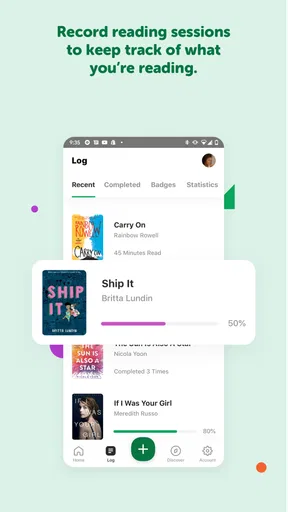
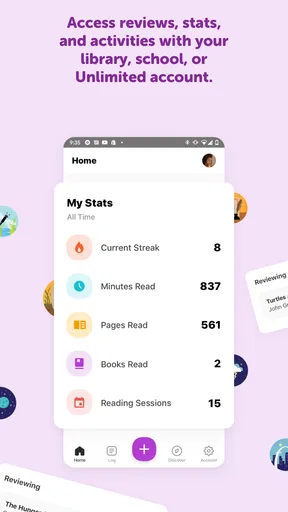
- Quickly logs reading sessions, minutes, pages, and completed books.
- Barcode scanning makes adding books to a personal reading list convenient.
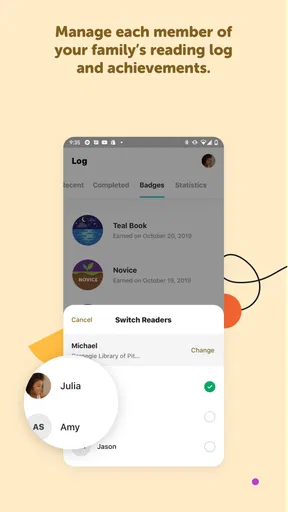
- Supports multiple reader profiles for families using one device.
- Reading challenges provide goals, progress tracking, and motivating badges.
- Available on both Android and iOS for easy access across devices.
Limitations of Beanstack Tracker
- Some features depend on a participating school, library, or organization.
- The interface can feel crowded when several challenges are active.
- Book searches may return incomplete or mismatched edition information.
- Requires an internet connection for syncing and accessing many features.
- Notifications and challenge reminders may become excessive for some users.
Similar Picks in This Category
View All
Duolingo: Language Lessons
Duolingo4.7

Google Classroom
Google LLC2.8

Unacademy: Learn & Crack Exams
Unacademy3.2

Bible App for Kids
Life.Church4.4

Cake - Learn English & Korean
Cake Corp.4.7

Brainly: AI Homework Helper
Brainly4.5
Frequently Asked Questions
What is Beanstack Tracker, and who is it designed for?
Beanstack Tracker is a reading and activity-tracking app connected to participating schools, libraries, and other organizations. It allows children, families, students, and educators to record books, minutes, pages, or other activities and follow progress toward reading challenges. Before downloading, check whether your school or library uses Beanstack, because many features depend on an organization-provided account or invitation.
How do I create an account or join my school or library’s Beanstack program?
After installing Beanstack Tracker, you can usually sign in through an existing account, create a new account, or join using a setup code, invitation, or organization search. The exact process depends on how your school or library configured its program. If you cannot find the correct organization, contact its staff rather than creating multiple accounts, since duplicate profiles can make reading history and challenge progress difficult to manage.
What can I record in Beanstack Tracker?
The app generally lets users log reading sessions and, depending on the program, record books, minutes, pages, audiobooks, or other literacy activities. Some challenges may also allow users to scan a book barcode, rate or review a title, and mark activities as complete. Available options vary by organization, age group, and challenge settings, so not every account will display the same tracking tools.
Does Beanstack Tracker work without an internet connection?
Beanstack Tracker is primarily designed for connected use because it must synchronize reading logs, challenge progress, badges, and account information with the organization’s online system. You may be able to enter some information temporarily when connectivity is limited, but synchronization can be delayed or unavailable until the device reconnects. For the most reliable experience, open the app with a stable internet connection after recording activities.
Is Beanstack Tracker free and safe for children to use?
The app is generally available at no direct cost to users, although access is commonly provided through a participating school, library, or organization. Because children may use the service, parents and guardians should review the organization’s privacy information, account requirements, and available profile settings before use. Avoid entering unnecessary personal details, use a strong password, and follow the school or library’s guidance for supervised accounts.
